Integrating the New Year Snow Globe Clipart Bundle 2026 into Your Creative Workflow
As the calendar turns toward 2026, content creators, small business owners, and digital marketers face the annual challenge of refreshing their visual assets. The demand for fresh, seasonally relevant imagery spikes in December and January, requiring a steady pipeline of high-quality graphics. This is where specialized asset packs, such as the New Year Snow Globe Clipart Bundle 2026, become essential components of an efficient design process. Rather than starting from scratch or licensing expensive custom illustrations, integrating pre-made, high-resolution elements allows professionals to maintain consistency while significantly reducing production time.
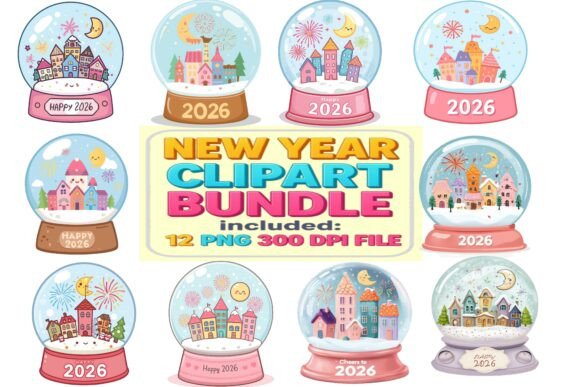
This bundle features twelve distinct pastel-style snow globes, each containing charming houses, colorful buildings, fireworks, moons, stars, and festive decorations. The kawaii aesthetic and soft color palette offer a specific tonal quality that differs from traditional, bold holiday graphics. Understanding how to leverage these assets within broader projects—from initial concept to final delivery—ensures that you maximize both their artistic value and their practical utility.
Pre-Production Planning and Asset Compatibility
Before importing any graphics into your design software, it is crucial to assess technical compatibility and project requirements. The New Year Snow Globe Clipart Bundle 2026 is delivered in PNG format with transparent backgrounds at 300 DPI. This specification is critical for two primary reasons: versatility and print quality.
Transparent backgrounds eliminate the need for manual masking or background removal, which can often result in jagged edges or loss of detail around complex shapes like fireworks or intricate building silhouettes. By using assets that are already isolated, you streamline the layering process in applications like Adobe Photoshop, Procreate, Canva, or Affinity Designer. The 300 DPI resolution ensures that these images remain crisp whether they are used for digital social media posts or physical products like greeting cards and stickers.
During the planning phase, consider the color theory of your upcoming campaign. The pastel tones and cute cityscapes in this bundle work best when paired with complementary soft hues or clean white space. If your brand guidelines require high-contrast, neon, or dark-mode aesthetics, you may need to adjust the brightness and contrast of these cliparts or use them as subtle background elements rather than focal points. Preparing a mood board that includes these snow globes alongside your typography choices and brand colors helps visualize the final outcome before you begin the actual design work.
Implementation Across Digital and Print Channels
Once the assets are vetted for compatibility, the next step is deployment across various channels. The versatility of the New Year Snow Globe Clipart Bundle 2026 allows for seamless integration into multiple workflows.
Digital Marketing and Social Media
For social media managers and digital marketers, speed and engagement are paramount. These cliparts can be used to create cohesive carousel posts, story highlights, or email headers. Because the files are lightweight yet high-resolution, they load quickly on mobile devices without sacrificing visual clarity. You can overlay text directly onto the transparent areas of the snow globes or use the globes as framing devices for promotional announcements. For instance, placing a "Happy New Year" message inside the glass dome of one of the illustrations creates an immediate thematic connection without cluttering the design.
Print-on-Demand and Physical Products
Entrepreneurs utilizing print-on-demand services will find the 300 DPI specification particularly valuable. Whether you are designing sublimation mugs, planner stickers, or greeting cards, the integrity of the image must hold up under printing processes. The cute, kawaii style appeals strongly to markets focused on stationery, children’s products, and lifestyle accessories. When preparing files for print, ensure that your document color mode is set to CMYK if required by your printer, although most modern digital printers handle RGB PNGs effectively. The transparent background allows you to place the snow globes on various colored papers or fabrics without unwanted white boxes appearing around the edges.
Educational and Classroom Resources
Educators and creators of educational materials can use these illustrations to make learning activities more engaging. The whimsical nature of the snow globes makes them ideal for worksheets, classroom decorations, or reward charts. Teachers can incorporate the images into math problems involving counting stars or fireworks, or use them in creative writing prompts about winter towns. The clear, simple lines of the clipart ensure that they remain legible even when resized for smaller handouts.
Workflow Efficiency and Organization
Integrating new assets into an existing library requires discipline to avoid clutter and ensure quick retrieval. When you download the New Year Snow Globe Clipart Bundle 2026, adopt a consistent naming convention and folder structure. Store the original PNG files in a dedicated "Assets/2026/New Year" directory. If you modify any of the images—such as adjusting hue or adding effects—save the edited versions separately to preserve the originals for future use.
Consider creating template files in your preferred design software that already include these cliparts positioned in common layouts. For example, a standard Instagram post template with a placeholder for a snow globe can reduce the time needed to create daily content during the busy holiday season. This approach shifts the workflow from reactive creation to proactive assembly, allowing you to focus on copywriting and strategy rather than repetitive graphic placement.
Quality Control and Consistency
Maintaining visual consistency is key to professional branding. While the twelve designs in the bundle share a cohesive style, using all of them in a single project might feel repetitive. Instead, select two or three favorite designs to serve as primary visual anchors, using the others sparingly for variety. Pay attention to the scale and rotation of the snow globes; keeping them aligned with your grid system ensures a polished look.
Additionally, check how the pastel colors interact with your background choices. On light backgrounds, the soft hues may blend in too much, requiring a subtle drop shadow or border to define the edges. On dark backgrounds, the colors will pop, but ensure that any text overlaid on the image remains readable. Testing your designs on different screens and printing a proof copy if possible are essential steps in the quality control process.
Long-Term Value and Repurposing
Although themed around the 2026 New Year, the core elements of these cliparts—snow globes, winter towns, and stars—have enduring appeal. After the New Year period passes, these assets can be repurposed for winter-themed content, general holiday greetings, or even bedtime story illustrations. The timeless nature of the kawaii aesthetic means these graphics do not feel dated quickly. By archiving them properly, you build a resource library that can be tapped into for future winter campaigns, reducing the need to purchase new assets every year.
In conclusion, the New Year Snow Globe Clipart Bundle 2026 is more than just a collection of images; it is a tool for enhancing workflow efficiency and maintaining high visual standards. By understanding its technical specifications, planning its integration into your design process, and applying it consistently across digital and print mediums, you can create compelling, festive content that resonates with your audience. Whether you are a seasoned designer or a hobbyist looking to add a professional touch to your projects, this bundle offers a practical solution for celebrating the season with creativity and ease.